How to play Huedle
Updated November 24, 2026 · Huedle Game editorial team
The goal of Huedle
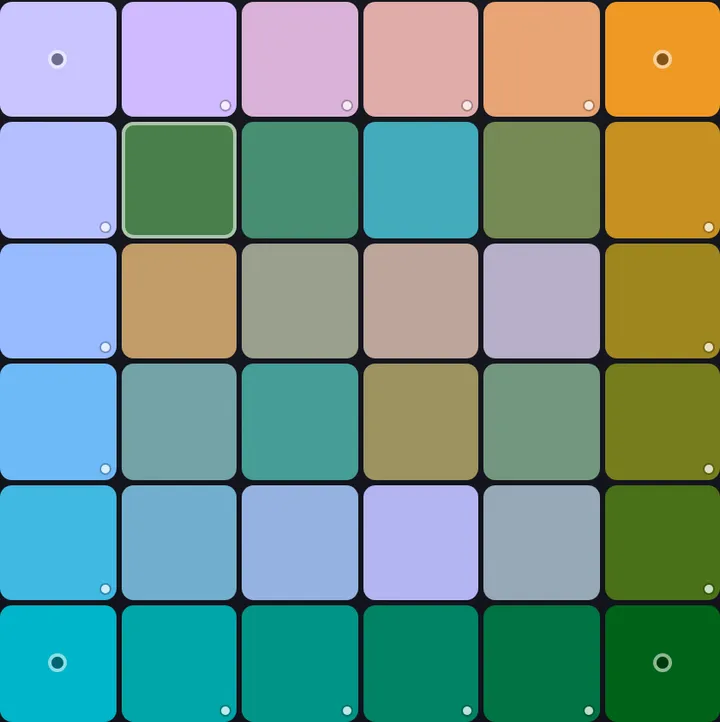
Every daily board starts as a perfect two-dimensional gradient: each row blends from its left color to its right color, and each column from top to bottom. The game scrambles the movable tiles. You win when the gradient is whole again. There is no way to lose; what you are measured on is how many swaps you needed and how long you took.
The rules of a Huedle board
- Anchor tiles never move. A tile with a dark dot and white ring is locked. The four corners are always anchors; Monday to Wednesday boards also lock the middle of each edge.
- Any two movable tiles can swap. They do not need to be neighbors.
- Each swap counts. Swapping two tiles back again counts as a second swap.
- Par is the target. It is the fewest swaps that can solve the scramble, calculated before you start. Solve in exactly par for a Perfect.
- One board a day. Everyone gets the same board for a date. It changes at midnight in your own time zone.
| Day | Board | Anchors |
|---|---|---|
| Monday | 5×5 | Corners, edge middles and center |
| Tuesday | 5×6 | Corners and edge middles |
| Wednesday | 6×6 | Corners and edge middles |
| Thursday | 6×7 | Corners only |
| Friday | 7×7 | Corners only |
| Saturday | 7×8 | Corners only |
| Sunday | 8×8 | Corners only |
How to play Huedle on a phone, mouse or keyboard
| Device | To swap two tiles |
|---|---|
| Phone or tablet | Touch a tile and drag it onto another, or tap one tile (it lifts and gets a white outline) and then tap the second. |
| Mouse or trackpad | Click and drag a tile onto another, or click two tiles one after the other. |
| Keyboard | Tab into the board, move with the arrow keys, press Enter or Space to pick a tile, move to the second tile and press Enter or Space again. |
Above the board are three buttons: How to play (a short reminder), Statistics (streaks and Perfect solves) and Settings. Below the board, Hint moves one tile home for you (it counts as a swap and marks the result as assisted) and Peek shows the solved colors for about a second.
Useful settings
- Show correct tiles: puts a small white dot on tiles that are already home. Turn it off for a harder game.
- Colour assist: prints each tile’s target number, for players who find some colors hard to tell apart.
- Reduce motion and Sound: switch off animations or the soft chimes.
How to play your first Huedle game, step by step
- Look before you touch. Note the four corner colors. The top edge must blend from the top-left corner to the top-right corner, and so on around the frame.
- Fill one edge. Pick the top edge. For each empty cell, find the tile whose color sits between its neighbors and swap it in.
- Go around the frame. Do the other three edges the same way. Each placed edge tile gets a check mark.
- Work inward. Use the finished frame as a guide for the next ring. The center of the board is roughly the average of all four corners.
- Finish and share. When the last tile lands, the board seals into one gradient and your result appears with your swaps, par, time and leaderboard rank. Tap Challenge friends to send the same board to someone else.
Once that feels easy, read the Huedle strategy guide: it explains why following “swap chains” always reaches par.
How to read the Huedle result screen
When the last tile lands, the board closes up into one seamless gradient and a result card opens. It shows four numbers: your swaps, the board’s par, your efficiency (par divided by your swaps) and your time. Above them is a rating:
| Rating | Meaning |
|---|---|
| Perfect | Solved in exactly par swaps with no hints |
| Brilliant | Within 10% of par |
| Great | Within 30% of par |
| Solved | Any finished board |
| Assisted | A hint or Colour assist was used |
Below the numbers you see your daily record (games played, streak and best streak), the points the solve earned on the leaderboard and your rank for the day. The Challenge friends button copies a short result with a link; anyone who opens it plays the same board with your score shown above it. The next board unlocks at midnight in your time zone, and the countdown on the card shows how long that is. Missed a day? Every earlier board is in the archive, numbered from #1 on November 1, 2026.
The other Huedle modes in one line each
- Huedle Bars: a gradient strip of vertical bars; lift a bar and drop it where it belongs. Three strips a day.
- Hex Huedle: type the six-digit hex code of a color; each digit tells you higher or lower. Six guesses.
- Hue Dial: match a color with hue, saturation and lightness sliders. Six guesses.
Huedle beginner mistakes
- Trying to drag an anchor. Ringed tiles are locked; the game shows a short message instead of moving them.
- Dropping between tiles. When dragging, release over the middle of the target tile; it gets a white outline when the drop will land there.
- Using Hint early. A hint costs points on the leaderboard. Save it for the last few near-identical tiles.
Questions beginners ask about Huedle
Is there a time limit in Huedle?
No. The clock only measures your solve for the leaderboard; you can take as long as you like, and the timer pauses when you switch to another tab.
Can I undo a swap in Huedle?
There is no undo button. Swapping the same two tiles back puts them where they were, but it counts as another swap, so think before you move.
What happens if I close the tab halfway through?
Your board, swap count and time are saved in the browser. Open Huedle again on the same device and browser and you continue exactly where you stopped.
How many swaps does a Huedle board take?
Par depends on the board: about 13 swaps on a Monday 5×5 board and about 56 on a Sunday 8×8, because par is always the number of movable tiles minus the number of cycles in the scramble.